What Makes ImgGen's AI Color Correction Different
Professional color grading that takes 10+ minutes in Photoshop — done automatically in under 10 seconds. Trusted by 2M+ creators for e-commerce, real estate, and social media photography.
AI-Powered Precision
Advanced deep-learning models analyze white balance, exposure, and color temperature across your entire image — delivering lab-grade correction that would take 10+ minutes manually in under 10 seconds.
Fully Automatic
No sliders, no manual tweaking. The AI analyzes your entire image — detecting lighting conditions, color casts, and exposure issues — then applies the optimal correction automatically. Just upload and download.
Batch Processing
Color correct up to 10 images simultaneously. The AI analyzes each photo individually, applying optimal corrections per image — perfect for e-commerce catalogs, real estate listings, and event photography.
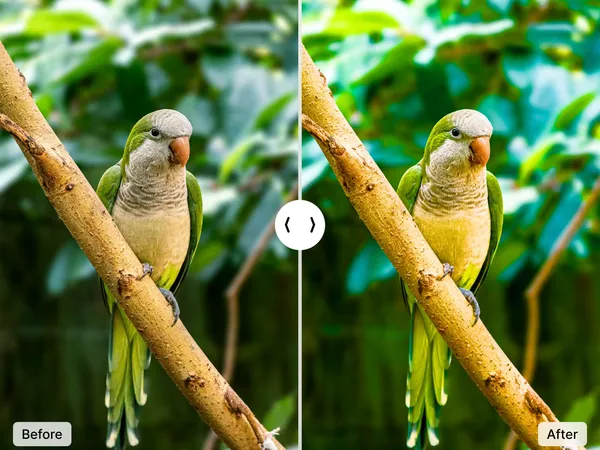
Fix White Balance and Color Cast in One Click
Wrong white balance is the most common color problem in photography — it makes indoor photos look orange under tungsten light, and outdoor shots appear blue on cloudy days. ImgGen's AI detects the lighting conditions in your image and corrects the color temperature automatically.
The AI also fixes underexposure, dull saturation, and color casts caused by mixed lighting — problems that typically require 5–15 minutes of manual adjustment in Lightroom curves and HSL panels.
Whether you're correcting a single product photo or an entire shoot, every image gets individually analyzed for optimal color balance.
Fix Colors NowIntelligent Color Spectrum Optimization
Your images may already look great, but the AI can detect subtle imbalances invisible to the naked eye. It automatically optimizes across the full color spectrum:
- White balance — Detects and neutralizes color casts from tungsten, fluorescent, or mixed lighting.
- Saturation & vibrance — Boosts dull colors while preserving already-saturated areas and skin tones.
- Exposure & contrast — Recovers detail in shadows and highlights for balanced, natural-looking results.
The entire process is automatic — no sliders, no presets, no manual tweaking. Unlike simple Instagram filters that apply uniform adjustments, the AI analyzes each image individually for optimal results.
Optimize Colors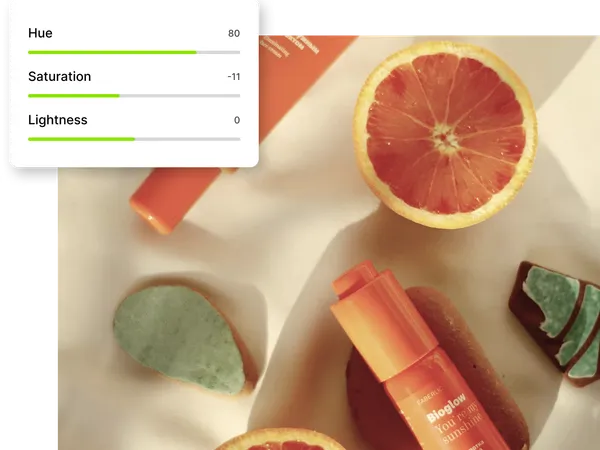
AI Color Correction vs. Manual Editing
How ImgGen compares to traditional photo editing tools for common color correction tasks.
| Feature | ImgGen AI | Photoshop / Lightroom | Free Filters (Instagram) |
|---|---|---|---|
| Processing time | Under 3 seconds | 5–15 minutes per photo | Instant |
| White balance correction | Automatic, per-image analysis | Manual eyedropper + sliders | Not available |
| Skin tone preservation | AI-aware, maintains natural tones | Requires manual masking | Often distorts |
| Batch processing | Up to 10 images, individually analyzed | Presets only (same settings for all) | One at a time |
| Skill required | None — fully automatic | Intermediate to advanced | None |
| Cost | Free (50 credits) | $10–55/month | Free |
| Output quality | Full resolution, no watermark | Full resolution | Compressed, may add watermark |
Who Uses AI Color Correction
From e-commerce stores to real estate agencies, professionals use AI color correction to save hours of manual editing while maintaining consistent, high-quality visuals.
E-Commerce Product Photos
Ensure consistent, accurate product colors across your entire catalog. Correct white balance shifts caused by studio lighting and make every listing photo look professional — crucial when 75% of online shoppers rely on product photos to make purchasing decisions.
Real Estate Listings
Fix dark, underexposed interior shots and correct color casts from mixed lighting. Properties with professionally color-corrected photos receive 118% more views than those with unedited images, according to the National Association of Realtors.
Social Media Content
Create a consistent visual aesthetic across your Instagram, TikTok, and LinkedIn feeds. AI color grading ensures every post matches your brand palette — without spending hours in Lightroom.
Old Photo Restoration
Revive faded, yellowed, or damaged vintage photographs with AI-powered color correction and colorization. Restore family photos from decades past to their original vibrancy in seconds.



Color Correction API for Developers
Integrate AI color correction into your product with a single API call. Send a POST request with an image URL and receive a fully corrected image in under 10 seconds — white balance, saturation, and exposure optimized automatically.
Used by e-commerce platforms for automated product photo enhancement, real estate listing services for consistent interior photography, and marketing tools for brand-consistent social media assets. Processes up to 1,000 images per hour with 99.9% uptime.
Get API KeyHow to Color Correct a Photo Online for Free
Fix dull colors, white balance issues, and flat exposure in three steps — no software download or design skills required.
Upload Your Photo
Drag and drop or click to upload your image. Supports JPG, PNG, and WEBP files up to 10 MB. Works with photos from any camera — smartphone, DSLR, or drone.
AI Analyzes and Corrects
The AI scans your photo's color histogram, identifies white balance issues, exposure problems, and saturation imbalances, then applies corrections in under 10 seconds.
Download Full-Quality Result
Preview the before/after comparison, then download your corrected image at full resolution — no watermark, no compression, no sign-up required.
Related AI Photo Editing Tools
Combine color correction with these tools for professional results.