What Is AI Photo Retouching?
AI photo retouching is the automated process of enhancing portrait photographs using deep learning models trained on millions of professionally edited images. Unlike manual retouching in Photoshop — which requires advanced skills and 15–30 minutes per photo — AI retouching identifies facial features, skin texture, and imperfections automatically, then applies professional-grade corrections in under 10 seconds.
ImgGen's AI Photo Retoucher delivers one-click portrait enhancement: skin smoothing, blemish removal, eye brightening, and color balancing — completely free, with no sign-up, no watermark, and no software download.
Why Use ImgGen's AI Photo Retoucher?
Professional portrait enhancement that saves hours of manual editing — powered by AI trained on millions of retouched photographs.
One-Click AI Retouching
Upload any portrait and get professional-grade retouching instantly. The AI detects imperfections, smooths skin, and brightens eyes — no sliders, no manual work.
100% Free, No Sign-Up
Professional retouching without the cost or commitment. No account, no watermark, no download — retouch unlimited photos directly in your browser.
Complete Enhancement Suite
Beyond basic smoothing: adjust colors, remove blemishes, enhance facial features, and balance brightness — all in one tool with Auto, Smooth, and Brighten modes.
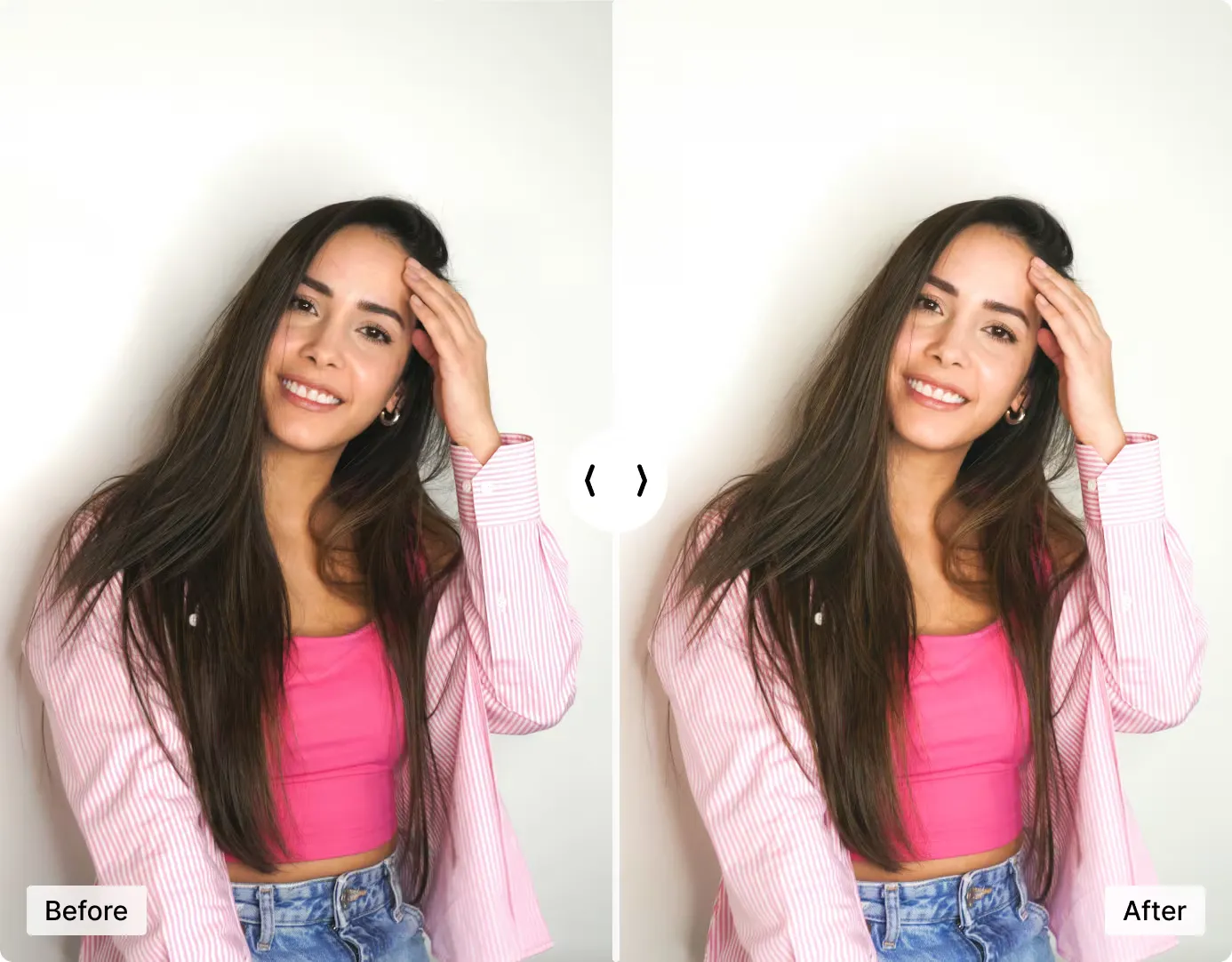
One-Click Portrait Enhancement
Turn your photos into flawless portraits with ImgGen's AI Photo Retoucher. Whether it's blemishes, wrinkles, or uneven tones, the AI smooths skin and enhances facial features in under 10 seconds.
Professional photographers report saving an average of 2–3 hours per session by replacing manual Photoshop retouching with AI-powered tools. ImgGen brings that same time savings to everyone — for free.
Perfect for selfies, professional headshots, LinkedIn profile photos, and social media content.
Retouch Your Photo NowRemove Blemishes and Imperfections Instantly
Get rid of pimples, acne scars, dark spots, and uneven skin texture with AI-powered blemish removal. The AI detects imperfections at the pixel level and removes them while preserving your natural skin texture and pores.
No brushes, no masking, no manual clone-stamping — the AI handles it all. The result looks natural, not over-processed. Ideal for portrait photography, dating profiles, and professional headshots.
Remove Blemishes Now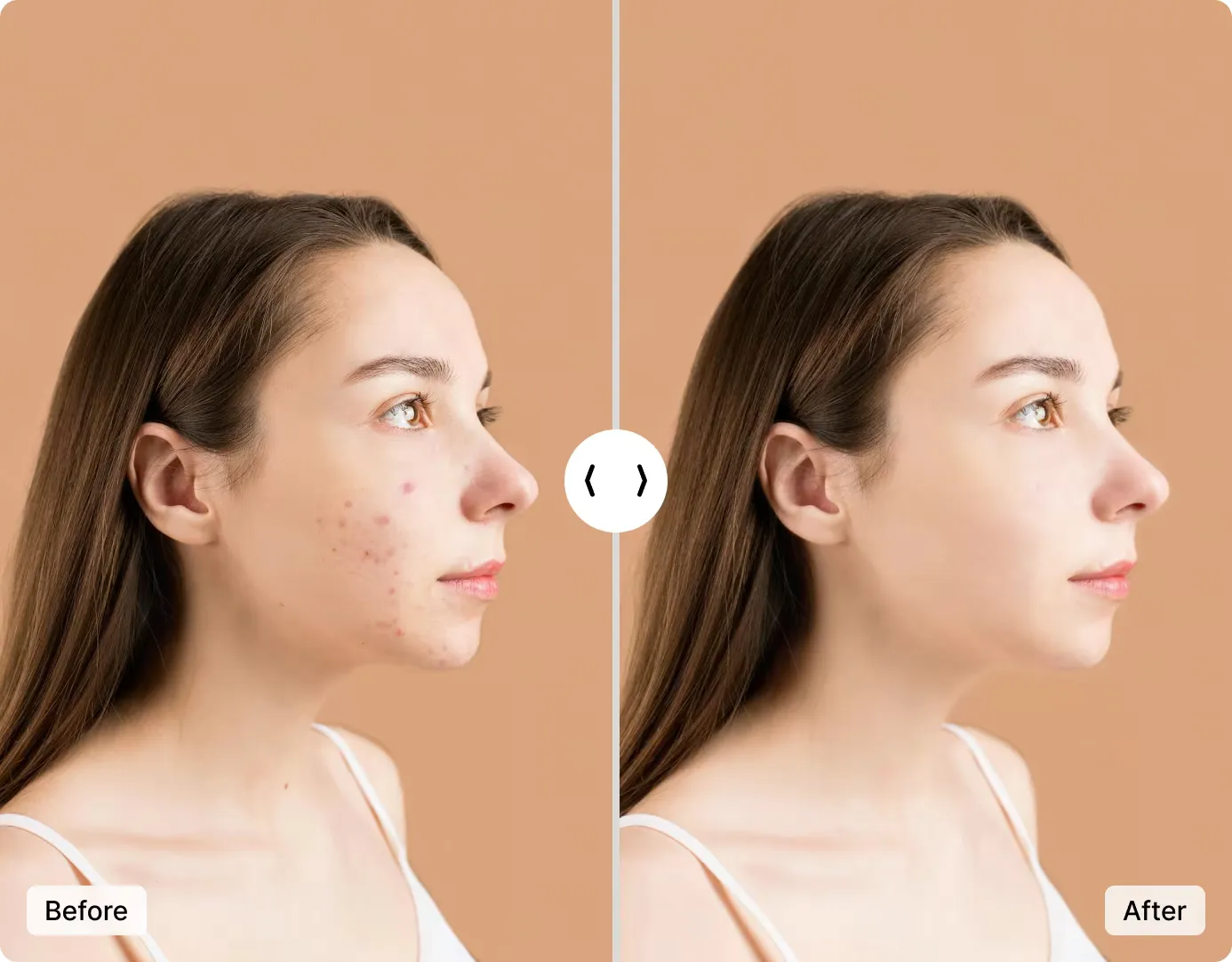
Who Uses AI Photo Retouching?
From professional photographers to job seekers — AI retouching saves time and delivers studio-quality results for every use case.
Professional Photographers
Speed up post-processing for headshots, events, and portrait sessions. Cut retouching time from 15 minutes per photo to under 10 seconds.
Social Media Creators
Polish selfies and content for Instagram, TikTok, LinkedIn, and YouTube thumbnails — get studio-quality results without Photoshop skills.
E-Commerce & Product Teams
Enhance model photos for product listings, lookbooks, and catalogs. Consistent, professional quality across hundreds of images.
Real Estate Agents
Polish professional headshots for listings, business cards, and websites — look your best without a studio appointment.
Job Seekers & Professionals
Create polished LinkedIn profile photos and resume headshots. First impressions matter — look sharp without hiring a retoucher.
Dating Profile Photos
Look naturally great in dating app photos. Subtle enhancement that smooths skin and brightens eyes without looking edited.

AI Photo Retoucher vs Photoshop vs Other Tools
See how ImgGen's free AI retoucher compares to Adobe Photoshop, freemium web editors, and mobile retouching apps across price, speed, and features.
| Feature | ImgGen AI | Photoshop | Freemium Web Editors | Mobile Apps |
|---|---|---|---|---|
| Price | Free | $22.99/mo | $5–10/mo | $0–9.99/mo |
| Processing time | ~3 seconds | 15–30 min (manual) | 5–30 seconds | 5–15 seconds |
| Skill required | None | Advanced | None–Basic | None–Basic |
| Works in browser | ✓ | ✓ (Creative Cloud) | ✓ | ✗ (app only) |
| No sign-up needed | ✓ | ✗ | ✗ | ✗ |
| No watermark (free) | ✓ | N/A (no free tier) | Varies | Varies |
| Full-res download | ✓ | ✓ | Often paid only | Often paid only |
| AI one-click retouch | ✓ | ✗ (manual workflow) | ✓ | ✓ |
| Skin smoothing | ✓ | ✓ (manual) | ✓ | ✓ |
| Blemish removal | ✓ | ✓ (manual) | ✓ | ✓ |
| Eye brightening | ✓ | ✓ (manual) | Varies | Varies |
| API available | ✓ | ✗ | Some | ✗ |
| Commercial license | ✓ (all plans) | ✓ | Paid plans only | Paid plans only |
Photoshop pricing from adobe.com (Photography plan, June 2026). Freemium and mobile categories represent typical offerings in each segment.
Integrate the Retouch Image API
Add automatic portrait enhancement to your product with the ImgGen Retouch Image API. Smooth skin, remove blemishes, and beautify faces at scale — ideal for photo apps, social platforms, e-commerce catalogs, and creative tools.
Send a photo with your chosen mode (auto, smooth, or brighten) and receive a retouched image back. Supports batch processing for high-volume workflows.
Get API KeyHow to Retouch a Photo Online for Free
Professional portrait retouching in three simple steps — no account, no download, no cost.
Upload Your Photo
Select a portrait, selfie, or headshot — supports JPEG, PNG, and WEBP formats up to 10 MB. Drag and drop or click to browse.
AI Enhances Your Portrait
The AI automatically smooths skin, removes blemishes, brightens eyes, and adjusts colors and brightness — typically in under 10 seconds.
Download Your Retouched Photo
Preview the enhanced result, compare before and after, and download in full resolution with no watermark — ready for sharing or printing.
AI Photo Retouching: Pros and Cons
A balanced look at AI retouching vs traditional manual editing to help you decide.
Advantages
- ✓Speed — processes a photo in seconds vs 15–30 minutes of manual work
- ✓Consistency — produces uniform results across hundreds of photos
- ✓Accessibility — no Photoshop skills or design training required
- ✓Cost — free tools like ImgGen eliminate software subscriptions
Limitations
- —Creative control — less granular than manual Photoshop editing for specialized creative effects
- —Artistic style — AI follows learned patterns rather than individual artistic vision
- —Edge cases — unusual lighting or non-portrait images may need manual adjustment
Verdict: AI retouching is the right choice for 90% of portrait enhancement needs. For specialized editorial or artistic retouching, combine AI as a starting point with manual fine-tuning in Photoshop.
More AI Photo Editing Tools
Explore ImgGen's full suite of free AI-powered image enhancement tools.